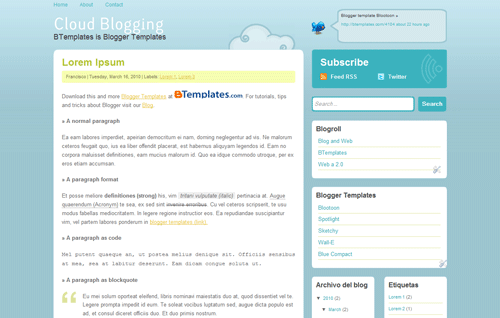
Blogging Cloud is a Blog and Web and BTemplates design, available as Blogger template and WordPress theme.
Features
- Two main columns, but sidebar with one or two columns.
- Three areas for gadgets / widgets.
- Twitter status box.
- Menu with static pages.
- Social Bookmarks on individual pages.
- Typography Lacuna Regular in titles (with javascript).
- Color Settings from the panel.
- Not compatible with the new Template designer.
- Borders rounded with images (compatible with IE).
Download
Installation
You can read our FAQ section to see how to install a blogger template.
Settigns
Search within your template code (Home → Design → Edit HTML) the following url:
http://twitter.com/btemplatesAnd replace it with your own twitter URL.
Now find:
btemplates.jsonReplace “btemplates” with your own username.
Menu
To add links to the menu, simply create a new static page from the Dashboard.
Lisence
Licensed under GPL. Permitted use on personal or commercial sites (without removing or adding links in the credits).
Tana Sarnt April 11, 2010 at 4:40 pm
Awesome template. But SEARCH function seems ‘dead.’ Put in several terms that are obviously in the blog, but nothing happens. Click search and the blog stays the same. Is there a link up I’m missing?
Anders April 12, 2010 at 2:06 pm
These themes will definitively lift my blog to a new dimension when implemented, if i can manage 🙂
Aruna Shields April 18, 2010 at 1:50 am
Nice one. <3 it
debsmaylena April 20, 2010 at 12:24 pm
Hey!Thanks for this template, I really like it. I’m trying to sync my twitter with the template but my tweets don’t appear in the speech box but the link does take readers to my profile. Help anybody?
Aruna Shields April 24, 2010 at 8:39 am
Its Best!!!!
wp2b June 29, 2010 at 12:00 pm
Hi, I am having difficulty in getting me theme to be listed on btemplates. Is that normal?
Hokya September 9, 2010 at 12:49 am
you must be inspired by Twitter, aren’t you?
Careerfield September 20, 2010 at 2:42 pm
Hey thanks for the template its great!
Adrian Yeo May 25, 2011 at 1:54 am
unable to add page element,
design > page elements> the menu appeared to be out of screen, and unable to click ‘edit’ or add any other elements. can help?