Tutorials, tips and tricks about Blogger

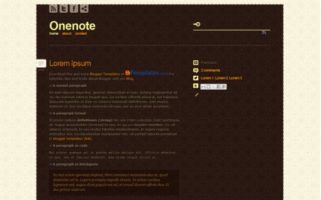
OneNote is another excellent design of Elena, Design Disease and Premium Themes. It has a stylish design in brown tones with one column on the front page and two columns on the other sections.

In the words of its author:

The theme features an elegant design that uses a dark (brown) content area against a light page background accented by a spiffy floral pattern reminiscent perhaps of libraries of old estate manors in the movies (or if you own one),

Features

  • 1 and 2 Columns.
  • Menu with static pages.
  • Color Settings from the panel.
  • Social menu.

Download

Read more →

The navigation bar (Next page link, previous page link or pagination) is one of the most important elements of a web design. A well-designed navigation bar allows user to turn the page on an almost instintive way and invites him to continue reading.

Reviewing the top 100 blogs of Technorati (yes, it’s still online) I present you a few that caught my attention to find some good and bad practices.

Showcase

Mashable

Mashable.com has a pagination, with numbers in big and clickable containers. Has links “Next” and “Previous” but not “Last” and “First”, which, in my opinion, are rarely helpful.

mashable

Engadget

Engadget.com has a clean and easily recognizable navigation.

engadget
Read more →

New icon pack from the design blogMaquiladora de Sueños” for our spanish sister site Blog and Web. Are eight social icons with a 3D effect and a glossy touch and a famous apple shape.

The web services included are Facebook, Twitter, Feed RSS, YouTube, Vimeo, Flickr, MSN, and Skype.

These are in three different sizes: 64×64, 100×100 y 200×200 in PNG with good quality to scale them easily. Have transparent background to match any design.

License
  • Released under Creative Commons Attribution 2.5 License.
  • Personal or commercial use is allowed but not selling.
  • When distributing, please link to this article and not to the file or to another post or server.
Download

Read more →

analytics

The way in which visitors come from search engines is valuable information about a blog, however, the way which users use the internal search form is rarely monitored.

Google Analytics has a fairly simple method to add this data to our reports.

1. In the Analytics dashboard, the blog of interest row, Actions column, click Edit.

Dashboard → Blog → Actions → Edit

At the Main Website Profile Information box, click Edit.

Main Website Profile Information → Edit

On the form, active Do Track Site Search and in the Query Pameter field, put: For Blogger: q. For WordPress: s. These correspond to search queries.

sitesearch-analytics
Read more →

Blogger has added a new feature, a few weeks ago, to its platform: buttons to share the content of a post through social services such as Facebook, Twitter, Blogger, Google Buzz or traditional email.

How to add them?

You need first to activate them:

Dashboard → Design → Blog Posts → Edit

share-button-blogger

If, with this, the buttons don’t appear on your blog after doing this, surely you’ve got a custom template, so you have to add the code manually to add the feature. In the code on your template (Dashboard → Desing → Edit HTML → Expand Widget Templates) search for something like this:

<div class='post-footer-line post-footer-line-3'>

Note: you can also search for post-footer-line-2 or post-footer-line-1.

After the code, add this:

<!-- Share Buttons --><div class='post-share-buttons'><b:include data='post' name='shareButtons'/></div>

Make sure all tags have been closed properly or errors will appear.

Customization

From the classes by default given by Blogger, you can add styles to the icons and customize their location, size or any other propierty using CSS. The classes given by Blogger are:

.post-share-buttons {} /* Buttons container */
.share-button {} /* This applies classes to all buttons */
.sb-email {} /* Share via Email */
.sb-blog {} /* Share on another blog on Blogger */
.sb-twitter {} /* Share on Twitter */
.sb-facebook {} /* Share on Facebook */
.sb-buzz {} /* Share on Google Buzz */

Conclusion

As always, Blogger brings features very late, when its users have been using them without its help. I think you get a complete option here as it allows you for share your information using the most used services like Facebook, Twitter and email. The email is maybe the main feature, as it adds a new page with a form easy to fill and make use of your Gmail contacts.

Tutorials, tips and tricks about Blogger